How to Create a Postgres Replica
Key components:
- WAL (write-ahead log): change records that make crash recovery and physical replication possible.
wal_level=replica: the primary must emit enough WAL for replication. On current PostgreSQL releases, this is already the default.pg_basebackup: takes a physical copy of the primary to seed the standby.standby.signalandprimary_conninfo: tell the new server to start in standby mode and stream from the primary.- WAL retention: use a replication slot,
wal_keep_size, or WAL archiving so the primary does not recycle segments the standby still needs.
What is WAL
Write-ahead logging (WAL) is the mechanism PostgreSQL uses to guarantee durability and recover from crashes. Before a change is considered committed, PostgreSQL writes a description of that change to WAL and flushes the WAL record to durable storage. The actual data pages can be written later. After a crash, PostgreSQL replays WAL to bring the data files back to a consistent state.[1]
WAL files live in the pg_wal directory. WAL segment files are 16 MiB by default, and PostgreSQL rotates through them as new WAL is generated.[2]
A simplified WAL flow looks like this:
- A transaction generates WAL records for a change.
- PostgreSQL updates in-memory shared buffers.
- On commit, PostgreSQL flushes the relevant WAL records.
- Dirty data pages are written to the data files later by background writes and checkpoints.
- If the server crashes, PostgreSQL replays WAL from the last checkpoint to recover.
WAL streaming to replica
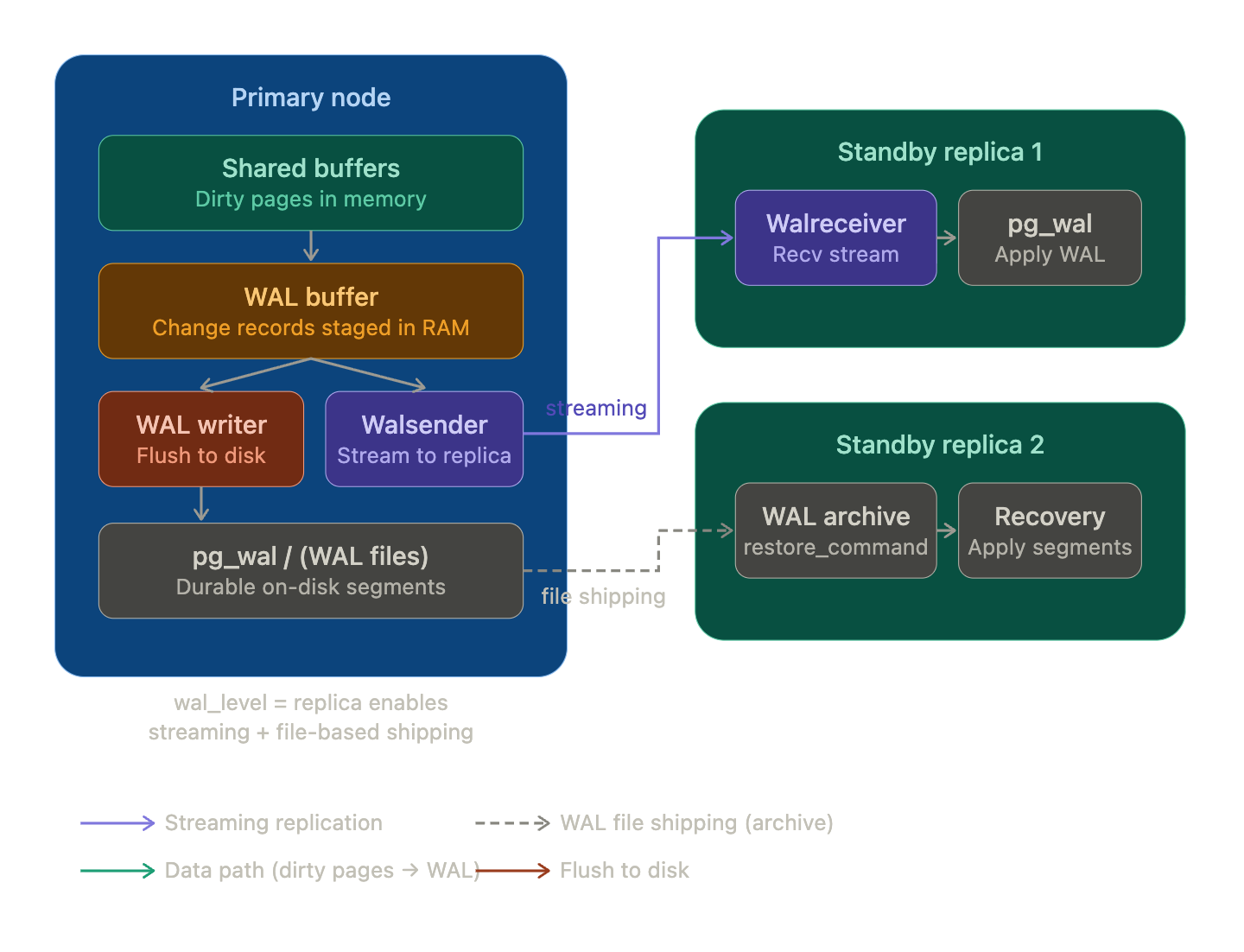
A physical replica starts from a base backup and then continuously replays WAL from the primary. pg_basebackup can take that initial backup from a running cluster. When you add -R, PostgreSQL creates standby.signal and writes the primary connection settings into postgresql.auto.conf, which is enough to boot the new instance as a standby on modern PostgreSQL releases.[3]
Quick setup
This example is for local Docker testing. It uses broad network rules and hard-coded passwords for brevity. For anything real, narrow the CIDRs, avoid trust, and prefer scram-sha-256 everywhere.[4]
You need a pg_hba.conf entry that allows both normal client connections and replication connections from the replica.
# Local demo only: trust local socket connections inside the container
local   all             all                                     trust

# Local demo only: replace 0.0.0.0/0 with your replica subnet in real deployments
host    replication     replicator      0.0.0.0/0               scram-sha-256
host    all             all             0.0.0.0/0               scram-sha-256
primary-init.sh
#!/usr/bin/env bash
set -euo pipefail

postgres_pid=""

cleanup() {
  if [ -n "$postgres_pid" ] && kill -0 "$postgres_pid" > /dev/null 2>&1; then
    kill -TERM "$postgres_pid" > /dev/null 2>&1 || true
    wait "$postgres_pid" || true
  fi
}

trap cleanup INT TERM

docker-entrypoint.sh "$@" &
postgres_pid=$!

echo "Waiting for primary PostgreSQL to accept connections..."
until pg_isready -h 127.0.0.1 -U postgres -d postgres > /dev/null 2>&1; do
  if ! kill -0 "$postgres_pid" > /dev/null 2>&1; then
    wait "$postgres_pid"
  fi
  sleep 1
done

echo "Ensuring replication role exists..."
psql -v ON_ERROR_STOP=1 -U postgres -d postgres <<'SQL'
DO $$
BEGIN
  IF NOT EXISTS (
    SELECT 1
    FROM pg_roles
    WHERE rolname = 'replicator'
  ) THEN
    CREATE ROLE replicator WITH REPLICATION LOGIN PASSWORD 'replicator';
  END IF;
END
$$;
SQL

wait "$postgres_pid"
replica-init.sh
#!/usr/bin/env bash
set -euo pipefail

DATA_DIR="${PGDATA:?PGDATA is not set}"
PRIMARY_HOST="primary"

echo "Waiting for primary to be ready..."
until pg_isready -h "$PRIMARY_HOST" -U postgres -d postgres > /dev/null 2>&1; do
  sleep 2
done

echo "Waiting for replication user to exist..."
until PGPASSWORD=postgres psql -h "$PRIMARY_HOST" -U postgres -d postgres -tAc "SELECT 1 FROM pg_roles WHERE rolname='replicator'" | grep -q 1; do
  sleep 2
done

# Only run basebackup if replica not initialized
if [ ! -f "$DATA_DIR/PG_VERSION" ]; then
  echo "Initializing replica data directory..."

  mkdir -p "$DATA_DIR"
  shopt -s dotglob nullglob
  rm -rf "$DATA_DIR"/*
  shopt -u dotglob nullglob
  chown -R postgres:postgres /var/lib/postgresql

  echo "Running pg_basebackup..."
  PGPASSWORD=replicator gosu postgres pg_basebackup \
    -h "$PRIMARY_HOST" \
    -D "$DATA_DIR" \
    -U replicator \
    -Fp \
    -Xs \
    -P \
    -R

  echo "Base backup complete."
else
  echo "Replica already initialized, skipping base backup."
fi

echo "Starting PostgreSQL replica..."
exec docker-entrypoint.sh postgres
This replica comes up correctly, but the primary still needs to retain enough WAL for the standby to catch up after brief disconnects. In this demo I use wal_keep_size; for a production setup, prefer a physical replication slot and/or WAL archiving.[5]
services:
  primary:
    image: postgres:18
    container_name: pg_primary
    restart: unless-stopped
    environment:
      POSTGRES_USER: postgres
      POSTGRES_PASSWORD: postgres
    volumes:
      - primary_pgroot:/var/lib/postgresql
      - ./primary/pg_hba.conf:/etc/postgresql/pg_hba.conf:ro
      - ./scripts/primary-init.sh:/scripts/primary-init.sh:ro
    ports:
      - "5430:5432"
    networks:
      - primary_net
      - backbone_net
    healthcheck:
      test: ["CMD-SHELL", "pg_isready -U postgres -d postgres"]
      interval: 5s
      timeout: 5s
      retries: 20
    entrypoint: ["/bin/bash", "/scripts/primary-init.sh"]
    command: >
      postgres
      -c wal_level=replica
      -c max_wal_senders=10
      -c max_replication_slots=10
      -c wal_keep_size=256MB
      -c listen_addresses='*'
      -c hba_file=/etc/postgresql/pg_hba.conf

  replica-1:
    image: postgres:18
    container_name: pg_replica_1
    restart: unless-stopped
    environment:
      POSTGRES_USER: postgres
      POSTGRES_PASSWORD: postgres
    depends_on:
      primary:
        condition: service_healthy
    volumes:
      - replica_1_pgroot:/var/lib/postgresql
      - ./scripts/replica-init.sh:/scripts/replica-init.sh:ro
    ports:
      - "5431:5432"
    networks:
      - replica_net
      - backbone_net
    healthcheck:
      test: ["CMD-SHELL", "pg_isready -U postgres -d postgres"]
      interval: 5s
      timeout: 5s
      retries: 20
    entrypoint: ["/bin/bash", "/scripts/replica-init.sh"]

networks:
  primary_net:
  replica_net:
  backbone_net:

volumes:
  primary_pgroot:
  replica_1_pgroot:
Notes
max_replication_slotsonly reserves capacity. It does not create a replication slot by itself.wal_keep_sizehelps a briefly disconnected standby catch up, but it is not a full replacement for WAL archiving or a persistent replication slot.hot_standbyis a standby-side setting. On current PostgreSQL releases it is enabled by default, so it is not required explicitly in this demo.[6]